Designing the Car Wash Data Model in Snowflake
Before you load a single row of data, you need to answer one question: what shape should this data be in? In Phase 2 of this series, I designed and created the five tables that form the backbone of a car wash membership analytics system β and explained the thinking behind every decision.
Quick Recap β Where We Are
In Phase 1, we built the Snowflake environment: one warehouse (CARWASH_WH), two databases (CARWASH_RAW and CARWASH_ANALYTICS), six schemas, and three roles with appropriate access controls. If you missed it, the Phase 1 post covers all of that.
Phase 2 is about schema design β the structure your data will live in. This is where most data projects succeed or fail. Get the model right now and everything downstream is easier: queries are simpler, transformations are predictable, dashboards are fast. Get it wrong and you’ll be fighting your own data forever.
Β What You’ll Learn in This Post
The difference between dimension and fact tables β with a car wash analogy. Which Snowflake data types to use and why. What the _loaded_at audit column is and why it belongs in every table. The full DDL for all 5 tables, with line-by-line explanation.
The Concept You Need First: Dimensions vs. Facts
If you’ve never built a data model before, this is the single most important concept to understand. Every analytics data model is built from two types of tables, and confusing them is the most common beginner mistake.
Dimensions: The WHO, WHAT, and WHERE
A dimension table describes a thing. It answers: who is involved? what is it? where is it?
- MEMBERS is a dimension β it describes a customer: their name, email, plan, and status
- LOCATIONS is a dimension β it describes a physical site: city, state, when it opened
- MEMBERSHIP_PLANS is a dimension β it describes a product: the plan name, price, tier
Dimension tables change slowly. A member’s name doesn’t change every day. A location doesn’t move. A plan price might update quarterly. These are relatively stable records.
Facts: The WHAT HAPPENED
A fact table records an event. It answers: what happened, when, and who was involved?
- VISITS is a fact β it records that member X visited location Y at timestamp Z
- TRANSACTIONS is a fact β it records that member X paid $24.99 for a renewal on date Z
Fact tables grow continuously. Every day, hundreds of new visits and transactions get added. They’re typically much larger than dimension tables, and they reference dimensions by ID rather than storing the full details.
Β The Car Wash Analogy
Think of it this way: a MEMBER is a dimension β they have a membership card with their details on it. A VISIT is a fact β the gate records every time that card scans. The membership card (dimension) changes rarely. The scan log (fact) grows every single day. When you want to answer ‘how often does each member visit?’, you join the fact table to the dimension table on member_id.
| Table | Type | Database.Schema | Represents |
| LOCATIONS | Dimension | CARWASH_RAW.LOCATIONS | Where each car wash site is |
| MEMBERSHIP_PLANS | Dimension | CARWASH_RAW.CRM | BASIC / DELUXE / ULTIMATE tiers + pricing |
| MEMBERS | Dimension | CARWASH_RAW.CRM | Customer records, plan, enrollment, status |
| VISITS | Fact | CARWASH_RAW.POS | Every car wash visit β linked to member + location |
| TRANSACTIONS | Fact | CARWASH_RAW.POS | Billing events: signups, renewals, upgrades |
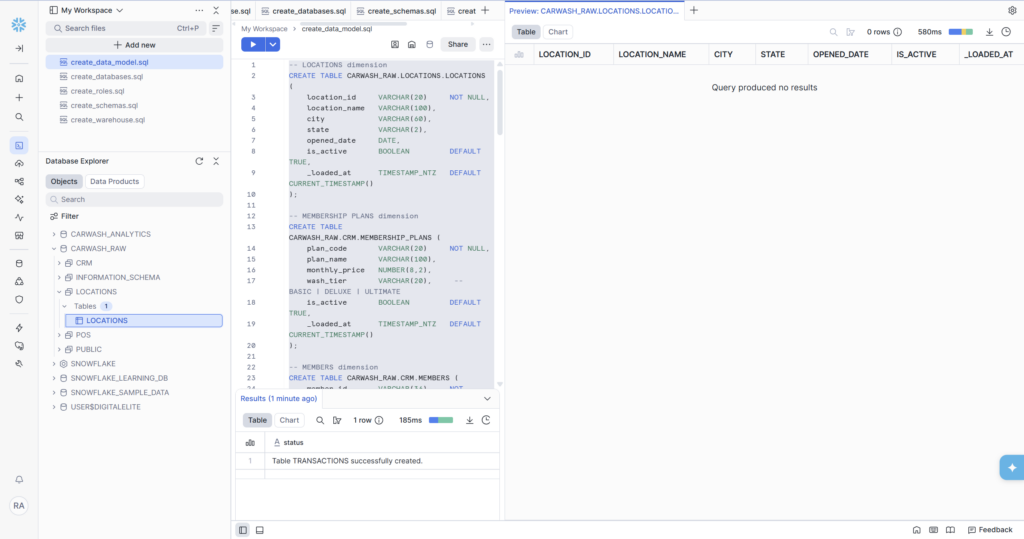
Table 1: LOCATIONS (Dimension)
The simplest table in the model. One row per physical car wash location. This is reference data β it changes rarely and is used to enrich visit and transaction records with human-readable location names and geographic data.
A few decisions worth explaining here:
- state is VARCHAR(2) β not VARCHAR(50). We only need the two-letter abbreviation (IN, OH, MN). Using the tightest possible type is good practice: it prevents someone from accidentally storing ‘Indiana’ in a field meant for ‘IN’, which would break joins later.
- is_active BOOLEAN DEFAULT TRUE β when we add a new location, it’s active by default. If it closes, we flip this to FALSE rather than deleting the row. Deleting dimension records breaks historical data.
- _loaded_at TIMESTAMP_NTZ β the underscore prefix is a convention for audit/system columns. NTZ means ‘no timezone’ β all timestamps in this system are stored in UTC.
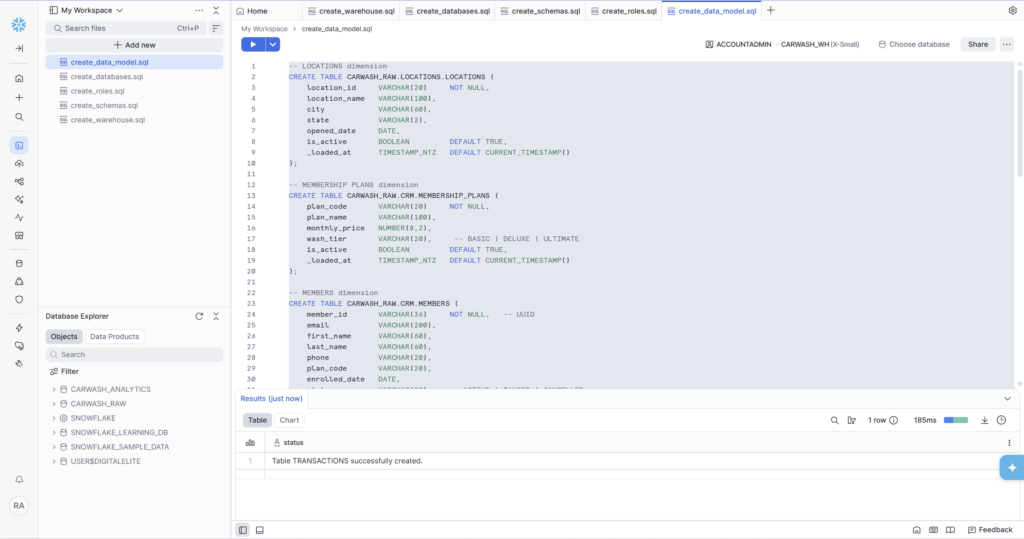
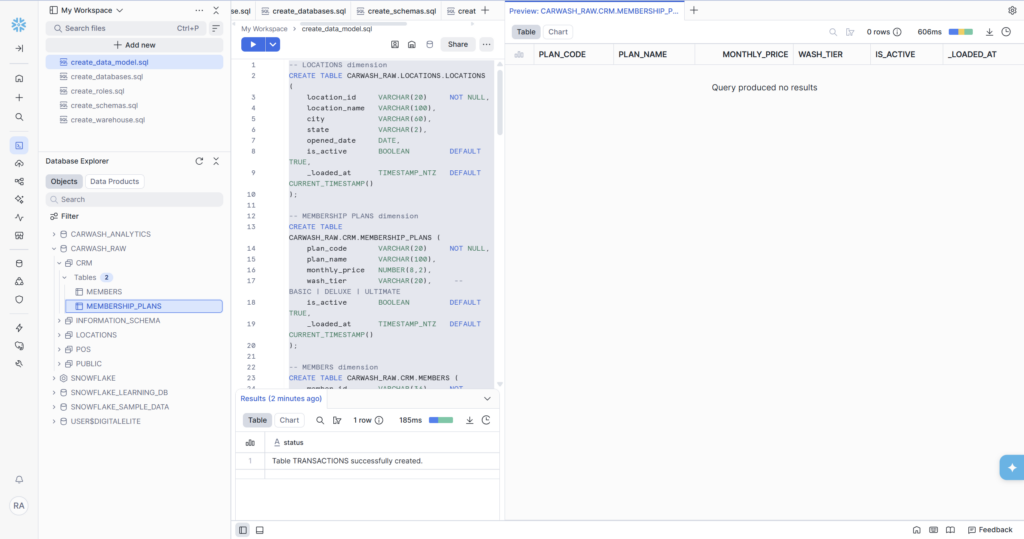
Table 2: MEMBERSHIP_PLANS (Dimension)
Another small, stable dimension. Three rows for now β BASIC, DELUXE, and ULTIMATE β but the table is designed to accommodate future plan changes without schema modifications.
Notice that monthly_price uses NUMBER(8,2) β this is Snowflake’s fixed-precision decimal type. The 8 means up to 8 total digits, and the 2 means exactly 2 decimal places. This is correct for currency: 14.99 stores as 14.99, not 14.990000001 the way a floating-point number might. Never use FLOAT for money.
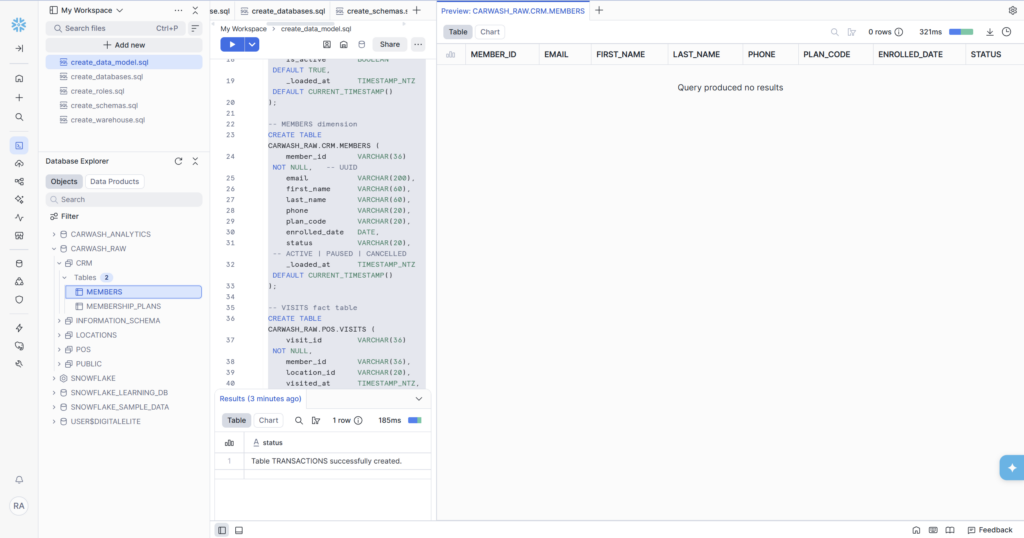
Table 3: MEMBERS (Dimension)
The most important dimension in the model. Every member who has ever signed up for a car wash membership gets one row here. This table is the backbone of the lifecycle model we’ll build in Phase 5 and feeds directly into CRM tools like Braze for targeted messaging.
Three design decisions here that matter in production:
- member_id is VARCHAR(36) because we expect UUIDs β the standard format used by most CRM and POS systems when generating unique identifiers (e.g., ‘550e8400-e29b-41d4-a716-446655440000’). UUID strings are always 36 characters including hyphens.
- phone is VARCHAR(20) β not an integer, not a formatted string. Phone numbers aren’t numbers you do math on. Storing as VARCHAR preserves leading zeros, international formats, and extension numbers.
- status is VARCHAR(20) with three expected values: ACTIVE, PAUSED, CANCELLED. In Phase 5, this field is the first input to the lifecycle classification β a CANCELLED member is always classified as ‘churned’ regardless of visit history.
Table 4: VISITS (Fact)
The first fact table. Every time a member drives through a car wash, a row is written here. This will be the largest table in the model over time β a busy location might generate hundreds of visit records per day.
The channel column is a good example of business context embedded in schema design. A car wash membership can be triggered four ways: via the mobile app, automatic license plate recognition, an RFID sticker on the windshield, or a walk-up purchase. Capturing how the visit was initiated enables behavioral analysis β are app users more loyal than license plate users? That kind of question is only answerable if you capture it here.
πΒ Foreign Keys β Why We Don’t Enforce Them Here
You might notice there are no FOREIGN KEY constraints linking member_id back to the MEMBERS table. This is intentional in analytics engineering. Enforcing FKs slows down bulk data loads significantly and creates load failures when source systems have referential integrity issues (which they always do eventually). Instead, we handle data quality through dbt tests and validation queries in later phases β not by making the database enforce constraints at write time.
Table 5: TRANSACTIONS (Fact)
The revenue fact table. Every billing event β new signup, monthly renewal, plan upgrade, or chargeback β creates a row here. This table is the source of truth for all revenue and MRR calculations.
The transaction_type field deserves attention. Four values capture the complete lifecycle of revenue:
- SIGNUP β first payment when a new member joins
- RENEWAL β recurring monthly billing (the bulk of revenue)
- UPGRADE β a member moves from BASIC to DELUXE or DELUXE to ULTIMATE
- CHARGEBACK β a disputed payment reversed by the bank (negative amount)
In Phase 4, when we build the monthly revenue trend query, we’ll filter on transaction_type = ‘RENEWAL’ to calculate MRR β because signups are one-time events and chargebacks are reversals, neither of which represents recurring revenue.
The Column That Appears in Every Single Table
You probably noticed that every table ends with the same column:
_loaded_atΒ Β Β TIMESTAMP_NTZΒ Β Β DEFAULT CURRENT_TIMESTAMP()
This is an audit column β and it’s not optional in a real data pipeline. Here’s why it exists:
- Incremental loading: when you load new data, you need to know what’s already been loaded. Filtering on _loaded_at >= last_run_time lets pipelines load only new records rather than reprocessing everything.
- Debugging: when a data quality issue appears, _loaded_at tells you exactly when the bad data arrived. Was it in yesterday’s load? Last week’s? That narrows the investigation immediately.
- Source freshness monitoring: tools like dbt can check whether _loaded_at has been updated recently. If it hasn’t, the pipeline is broken and you want to know before anyone notices on a dashboard.
The underscore prefix (_loaded_at vs loaded_at) is a widely adopted convention in data engineering that signals ‘this column was added by the pipeline, not the source system’. It makes it immediately clear in any query which columns are business data and which are infrastructure.
What We Built β Phase 2 Complete
All five tables are live in Snowflake. The Database Explorer shows the complete schema tree: CARWASH_RAW now has CRM (MEMBERS, MEMBERSHIP_PLANS), LOCATIONS (LOCATIONS), and POS schemas ready to receive data. Every table has the correct columns, types, and audit fields.
β Β Phase 2 Deliverables β All Complete
- CARWASH_RAW.LOCATIONS.LOCATIONS β location dimension, 7 columns
- CARWASH_RAW.CRM.MEMBERSHIP_PLANS β plan dimension, 6 columns
- CARWASH_RAW.CRM.MEMBERS β member dimension, 9 columns including UUID member_id
- CARWASH_RAW.POS.VISITS β visit fact table, 7 columns including channel
- CARWASH_RAW.POS.TRANSACTIONS β transaction fact table, 8 columns including transaction_type
- All tables include _loaded_at audit column with CURRENT_TIMESTAMP() default
β’ SQL saved as create_data_model.sql in Snowsight workspace
What’s Coming in Phase 3
The tables exist but they’re empty β 0 rows in every preview panel. Phase 3 fixes that. We’ll populate all five tables using two different methods:
- Direct INSERT statements β for small reference data like locations and membership plans
- Snowflake Stages + COPY INTO β the production-grade way to load CSV data in bulk, the same pattern used by real data pipelines
Phase 3 is the most visual phase of the series β you’ll see data actually land in the tables for the first time, and the COPY INTO command is great screen recording content. Stay tuned.
πΒ GitHub Repo
The create_data_model.sql file from this phase is in the /schema folder at github.com/aucampr/snowflake-carwash-analytics. All 5 CREATE TABLE statements are there with comments.
Follow Along
This is part of a 6-phase series building a complete Snowflake analytics data warehouse β from blank account to live KPI dashboards β using a car wash membership dataset. Each phase ships as a blog post, and a LinkedIn post.